Wikipedia Quick Search
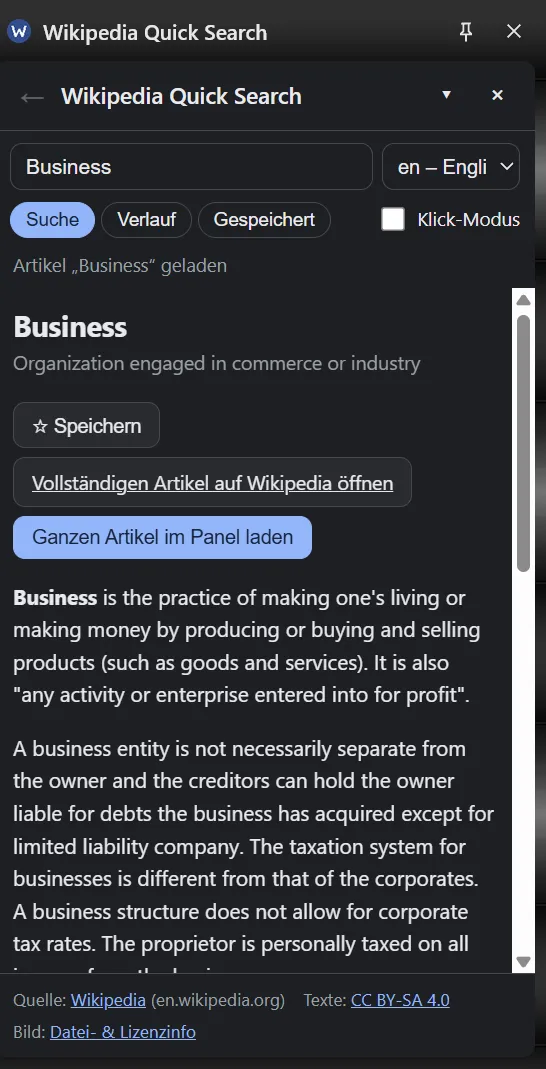
A browser extension that opens the Wikipedia article for any selected text in the browser’s side panel.
- Problem
- Looking something up while reading usually means leaving the page, opening a new tab and losing your place.
- Built
- A cross-browser extension that answers a keyboard shortcut (Alt+W, or Option+W on macOS) with the matching article in a native side panel, straight from Wikipedia’s own API.
Where it came from
The extension grew out of a design-thinking collaboration between the HPI d-school and Wikimedia Deutschland about how people reach knowledge while they read. A five-person team did the needs analysis and early prototyping with Wikimedia; I built the extension itself. The first prototype was a web app with a simulated browser and a language-model backend. The released version keeps only the interaction ideas and drops everything else: no language model, no server of its own, no tracking.
How it works
Selecting text and pressing the shortcut sends a validated message from the page to the extension’s background worker, which queries the MediaWiki Action API and renders the result in the side panel. Where a browser has no native side panel, a sandboxed drawer inside a closed Shadow DOM takes its place.
- One codebase, four browsers. Strict TypeScript, bundled per target. Browser differences are isolated in a thin adapter with feature detection:
chrome.sidePanelin Chrome and Edge,sidebar_actionin Firefox, and an in-page drawer for Safari builds. - Untrusted HTML, treated as untrusted. Article HTML passes through DOMPurify with a strict allowlist and reaches the DOM through a single controlled sink. The content security policy forbids
unsafe-eval, runtime messages are schema-validated, and imports of saved data are protected against prototype pollution. - Permissions only when needed. The optional click-to-look-up mode registers its content script at runtime, and only after the user grants access to the current site. Without that permission the shortcut still works.
- Private by construction. History, saved articles and settings stay in the browser’s local storage, with JSON export and import. Queries go directly to Wikipedia.
- Accessible. Full keyboard operation, ARIA live regions, dark mode,
prefers-reduced-motion, and zoom up to 200 %. - Attribution. Every article shows its source, language and licence, as Wikipedia’s CC BY-SA terms require.
Status
Version 1.0.0 was released in July 2026 and is published for Chrome and Firefox, and installable in Edge. At the beginning of November 2026 the Chrome Web Store reported 184 cumulative installations. That is a count of installs over time, not of active users.